

What the Case Management Feature Enables
Case TrackingCreate and manage cases for clients or employers. Track visa applications, accreditation applications, job checks, and other immigration matters through their entire lifecycle.
Task ManagementCreate checklists and tasks for each case. Assign tasks to team members, set due dates, track completion, and ensure nothing falls through the cracks.
Case CategoriesOrganise cases using categories that match visa types and application categories. Create custom categories for different countries and immigration pathways you handle.
Documents & NotesUpload and store all case-related documents. Add detailed notes to track conversations, decisions, and important information throughout the application process.
Deadline TrackingSet key dates like lodgement deadlines, hearing dates, and decision dates. Keep track of critical timeframes and never miss an important deadline.
Case InvoicingLink invoices directly to cases. Track which cases have been invoiced, manage payments, and maintain clear financial records for each application.
Contracts & FormsCreate and send service agreements and digitised PDF forms directly from the case. Clients can sign contracts and complete forms online, with responses saved to the case.
Team CollaborationAssign multiple team members to cases. Track who’s responsible for what, ensure clear accountability, and collaborate effectively on complex applications.
Accessing the Cases Page
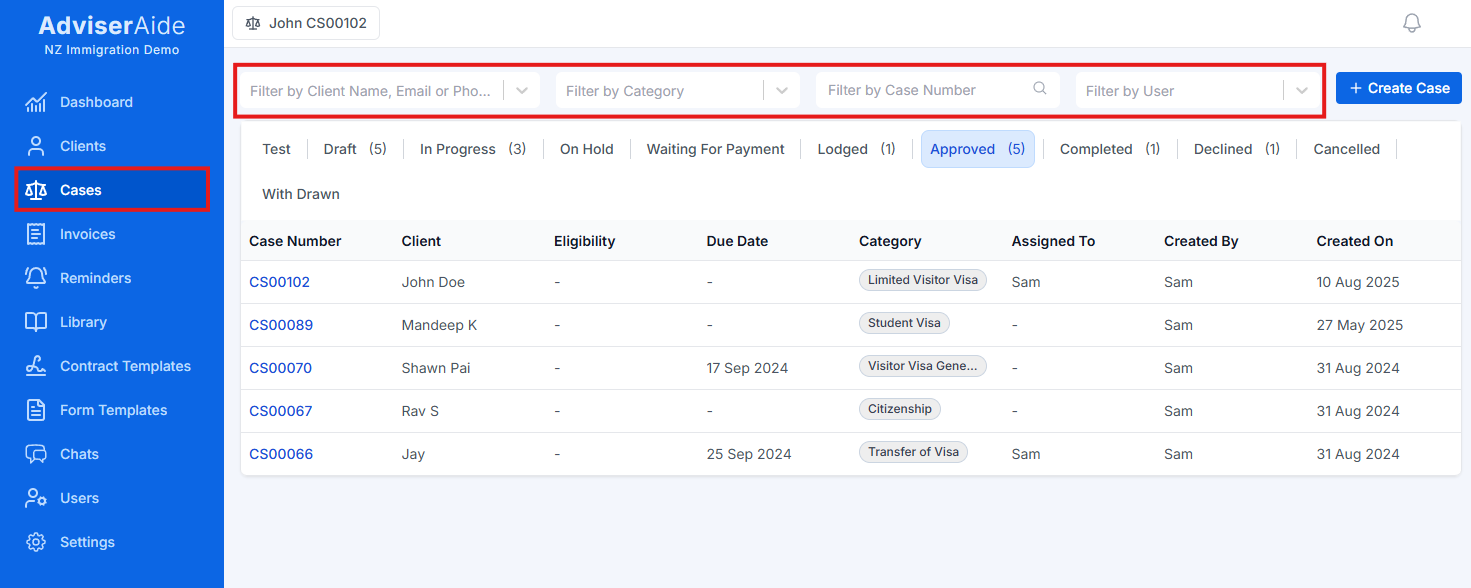
Cases list page showing all immigration cases
Case Status Navigation
At the top of the page, you can filter cases by their current status:- Draft – Cases being prepared but not yet in progress
- In Progress – Active cases currently being worked on
- On Hold – Cases temporarily paused
- Waiting for Payment – Cases awaiting client payment before proceeding
- Lodged – Applications formally submitted to immigration authorities
- Approved – Applications that have been granted
- Completed – Finished cases (approved, visa issued, etc.)
- Declined – Applications that were refused
- Cancelled – Cases that were withdrawn or cancelled
The Case List
The list displays the following columns:- Case # – System-generated unique case reference number
- Client/Employer – Who the case is for
- Eligibility – Case eligibility assessment or description.
- Due Date – Case deadline.
- Category – The visa type or application category (colour-coded tag)
- Status – Current case status with visual indicator
- Assigned Users – Team members working on this case
- Created By – Team member who created the case
- Created On – Date the case record was created
Next Steps
Creating a Case
Learn how to create new case records
Case Profile
Understand the case profile layout and features
Case Categories
Learn how to create and manage case categories
Managing Tasks
Learn how to create and manage case tasks