AdviserAide home page
Search...
⌘K
Contact Us
Website
Login
Login
Search...
Navigation
Users
How to Change Password
Overview
Introduction
Getting Started
How to Guides
Privacy Policy
Data Security
Terms of Service
Client Management
Clients Overview
Create a Client
Client Profile
Client Relationships
Case Management
Cases Overview
Create a Case
Case Profile
Case Tasks
Multiple Contacts
Case Categories
Employer Cases
Invoices
Create Invoice
Add Payment
Credit Notes
Reminders
Invoice to Contact
Email Templates
Advance Payments
Employer Management
Employers Overview
Create an Employer
Employer Profile
Contracts
Create Contract
Contact Placeholders
Contract FAQ
Users
Creating a User
Change Password
Account Setup
Email Signature
PDF Forms
PDF Forms Overview
Digitizing PDF Forms
PDF Form Fields
Advance Forms
Creating Advance Forms
Advance Form Fields
Conditional Fields
Custom Fields
Overview
Creating Custom Fields
Others
Settings
Shortcuts
Chrome PDF Issue
Users
How to Change Password
Copy page
Copy page
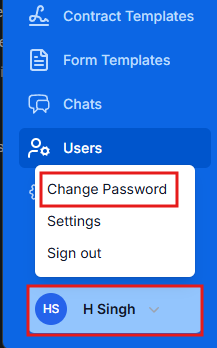
From the bottom of the left menu, locate your logged-in username. Click it, then select
Change Password
. You will be redirected to a workflow where you can follow the steps to update your password.

Creating a New User
Previous
Setting up Adviseraide Account
Next