

PDF Tools helps you prepare documents without leaving AdviserAide. You can combine PDF files, reduce their file size, split pages into separate documents, convert images to PDF, organise pages and add notes. AdviserAide saves the result as a new PDF. Your original files are not changed.

Three ways to open PDF Tools

1. From case documents

Open Cases, select the case, then open Documents. Tick the PDF file or files you want to work with, then select PDF Tools from the action bar.
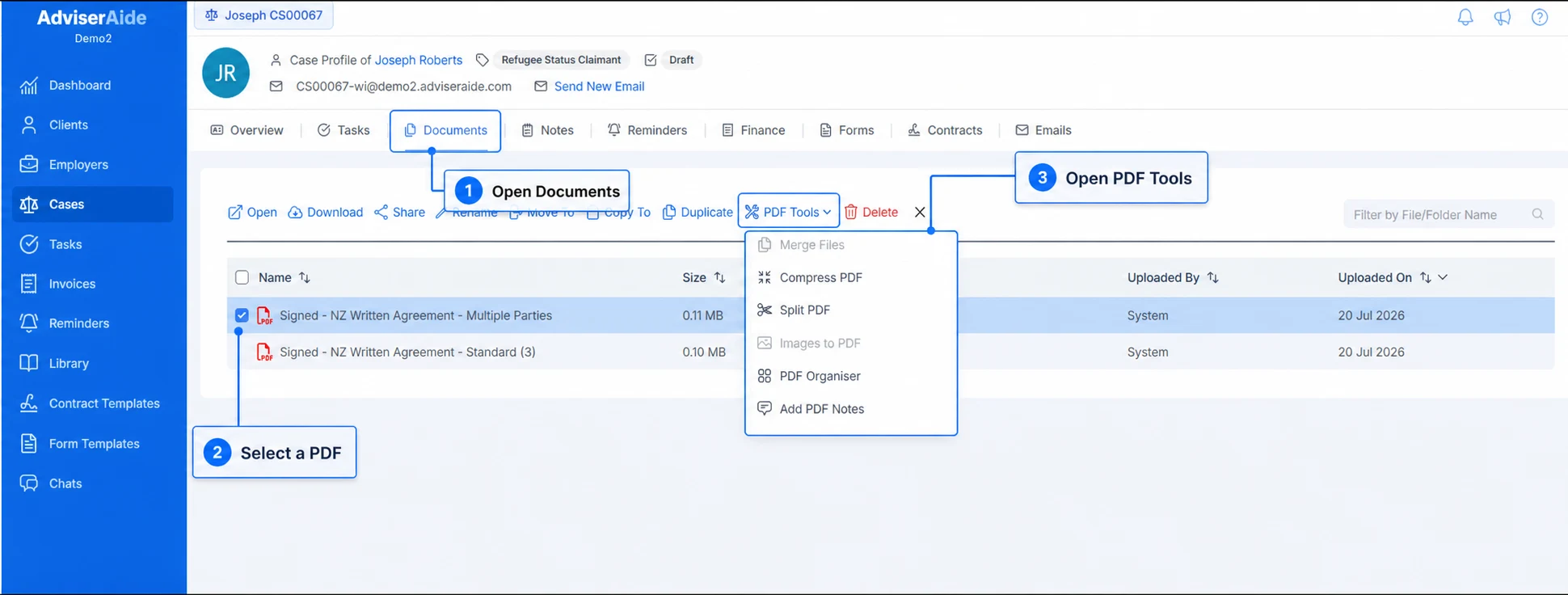
Case Documents annotated to show opening Documents, selecting a PDF and opening PDF Tools

Open Documents, select a PDF and then open PDF Tools

The available options depend on the files you select. For example, Merge Files becomes available when you select two or more PDF files.

2. From the document overview

Select a PDF file to open its document overview. Select PDF Tools beside Download, then choose the tool you want to use.

3. From the Library

Open Library from the main menu. Tick the PDF files or images you want to work with, then select PDF Tools from the action bar.

Available PDF tools