

Credits, waive-offs and refunds you record in AdviserAide become credit notes in Xero, applied to the right invoice, so the amount owing matches in both systems. This page covers the Xero side - for the flows themselves, see Adding Credit Notes and Issuing a Refund.

Credits and waive-offs

When you add a credit note or waive a remaining balance on an invoice that is in Xero, a corner message shows Sending credit note to Xero… and then Xero has been updated. In Xero, the credit note appears applied against the invoice, and waive-offs are coded to your chosen waive-off account so they stay separate in your reporting. Credit notes sync quietly in the background. If one cannot reach Xero, the invoice shows a banner naming the credit note and the problem - see Troubleshooting.
A credit note added before the invoice itself has been sent waits quietly and syncs right after the invoice does - see Sending invoices.

Refunds

The Add Refund form includes a Xero section:
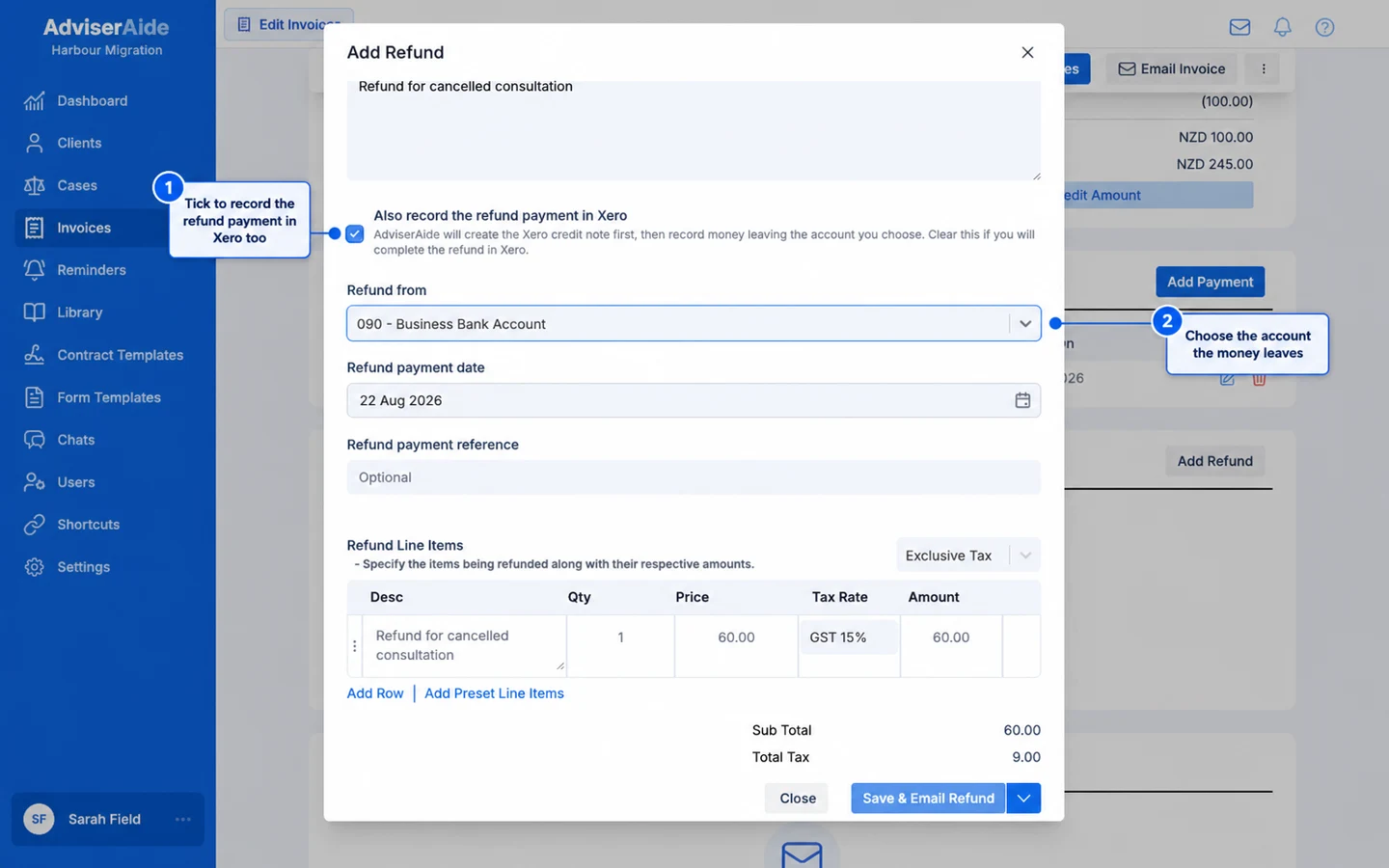
Choose whether AdviserAide also records the refund payment in Xero

  • Also record the refund payment in Xero (on by default) - AdviserAide creates the Xero credit note first, then records the money leaving the Xero account you choose. Xero shows the credit note with a cash refund applied - the complete picture, with no follow-up needed in Xero.
  • Refund from - The Xero bank or payment account the refund money leaves.
  • Refund date and reference - Recorded against the refund payment in Xero.
Clear the tick box if you prefer to complete the refund inside Xero yourself. AdviserAide then sends only the credit note, which stays open in Xero until you record the refund payment there - AdviserAide picks the payment up on the next sync.

Credit note numbers

Xero numbers credit notes using its own sequence, so the Xero copy carries a Xero number (for example CN-0067) while AdviserAide keeps its own (for example CRD00013). The AdviserAide number and the refund reason are saved as the Xero credit note’s reference, so you can match the two either way.

Deleting a credit note or refund

If a credit note or refund has synced to Xero, deleting it in AdviserAide also removes it from Xero. You’ll see Refund deletion is queued for Xero, then the corner message Removing credit note from Xero…. The invoice totals in both systems update when this finishes. A credit note that never reached Xero is simply deleted here, with nothing to clean up there.