

Connection problems
Xero has been disconnected, so this invoice cannot sync right now
Xero was disconnected from Settings → Integrations. Everything you do is remembered in the meantime. Reconnect from Settings → Integrations and it all catches up automatically - see Pausing and disconnecting.Xero is no longer allowing this connection to sync
Access was removed inside Xero (its Connected apps page), or the connected Xero user lost invoice and payment access. Select Reconnect to Xero in Settings → Integrations and sign in again; syncing resumes automatically once reconnected.Xero needs to be connected again. Reconnect it from Settings → Integrations.
The connection’s authorisation is no longer valid. Reconnect from Settings → Integrations - everything queued while it was down sends as soon as you do.Reconnecting Xero did not finish
A reconnect was started but the Xero sign-in was closed or failed part-way. Go to Settings → Integrations and press Reconnect to Xero to try again.The Xero connection is missing a permission required for this sync
The Xero sign-in did not grant everything AdviserAide needs. Reconnect from Settings → Integrations and approve the requested access on the Xero page.Syncing is turned off. Turn it on in Settings → Integrations to sync again.
Syncing is paused. Nothing is lost - turn Sync with Xero back on and everything recorded in the meantime syncs automatically.An invoice will not send
When Xero refuses an invoice, the invoice shows a red Xero sync failed banner with the reason, and the invoice is listed under See what needs fixing in Settings → Integrations: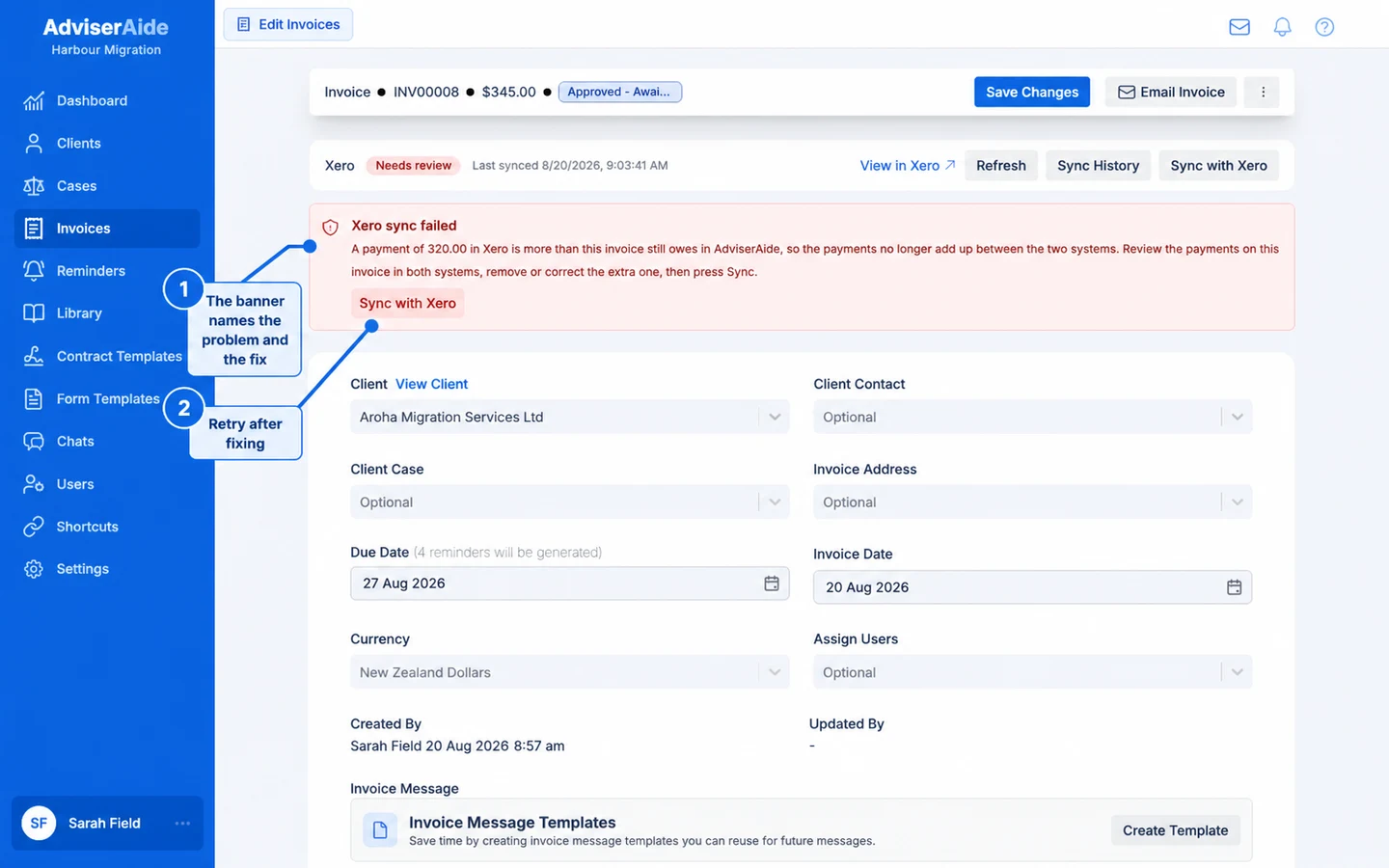
The failure banner names the problem and the fix, with a button to retry
Xero would not accept this change (Update blocked)
The invoice is usually paid or voided in Xero, so Xero will not accept edits to it. Open the invoice in Xero and check its status, payments and credit notes. If it cannot be corrected there, void the invoice in AdviserAide and create a replacement.This invoice no longer matches its copy in Xero (Different in Xero)
Someone changed the invoice in Xero. Open it in Xero and compare the two. Syncing replaces the Xero version with the AdviserAide one, so only press the sync button if AdviserAide is correct.Payment problems
Temporary problems that fix themselves
These messages need no action - AdviserAide retries automatically and the record stays safely queued:- Xero is currently unavailable. We will retry automatically. - Xero itself is down or unreachable. You can check Xero’s status page.
- Xero is limiting requests right now. - A busy period; syncing resumes by itself shortly.
Messages that need support
A small number of messages ask you to contact support - for example AdviserAide could not complete this request to Xero or Xero refused this sync request in a way AdviserAide does not recognise. Nothing on the invoice needs changing; send support the date and time shown with the message.Still stuck?
- Open the invoice’s Sync History - it records every attempt with its outcome and is often the fastest way to see what happened.
- Check Settings → Integrations for the connection state and anything listed under See what needs fixing.
- Contact support with the invoice number and the time of the failed sync.